Make a Retro Arcade Game Host with a Talking Avatar
Insert coin to continue. That phrase alone makes most of us grin, and it’s the perfect energy for a video host. A retro arcade presenter, brought to life as a talking photo in Pippit, can introduce game reviews, run trivia nights, or just rant happily about high scores. You don’t need to code anything or hire an announcer. You need a pixel-style portrait, a script full of attitude, and a willingness to be a little cheesy. Ready, player one? Open Pippit and let’s boot up your host.
Why the arcade vibe still wins
Arcades carry a feeling that never really went away: neon, noise, rivalry, and a pocket full of quarters. Anything wearing that look gets an instant emotional head start, especially with people who grew up in front of a cabinet. A host who speaks in game-show shouts and countdown jokes taps into that without trying hard. It also solves a practical problem. Retro pixel art is forgiving, stylized, and easy to create, so even a rough character looks intentional rather than amateur.
Sound that feels like a 1985 arcade
A host looks great, but an arcade is mostly noise, and SeedAudio 1.5 can make that noise on request.
Chiptune-style music on demand
Describe the music you want, say bouncy and bright with a driving beat, and background tracks are generated along with the rest of your audio.
Bleeps, buzzers, and crowd murmur
Sound effects and ambience come from text prompts too, so a coin drop or a distant cabinet jingle is just one sentence away.
A full mix in a single pass
Dialogue, effects, ambience, and music can be created together, giving you something cohesive without stitching parts together from different sources.
Separate tracks for fine-tuning
Everything arrives on its own track, so the announcer stays clear while the music sits lower in the mix.
Designing a host with pixel-sized personality
Before you generate anything, pin down who your host is. Ideas to mix and match:
- A sunglasses-wearing announcer with an endless supply of catchphrases.
- A friendly robot that keeps score and gets sulky when you lose.
- A neon ghost who haunts the leaderboard.
- A grumpy cabinet that complains about being unplugged overnight.
- A retired champion who exaggerates every victory.
Player one starts here: the three-step run
Your host is designed and your script is brewing. Here’s the run through Pippit.
Step 1: Load your character
Sign in to Pippit and open the Video generator.
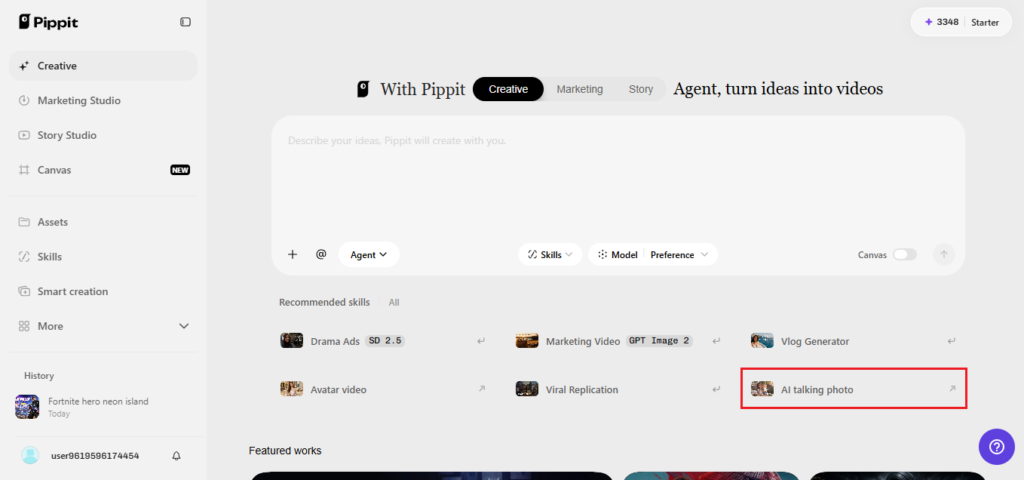
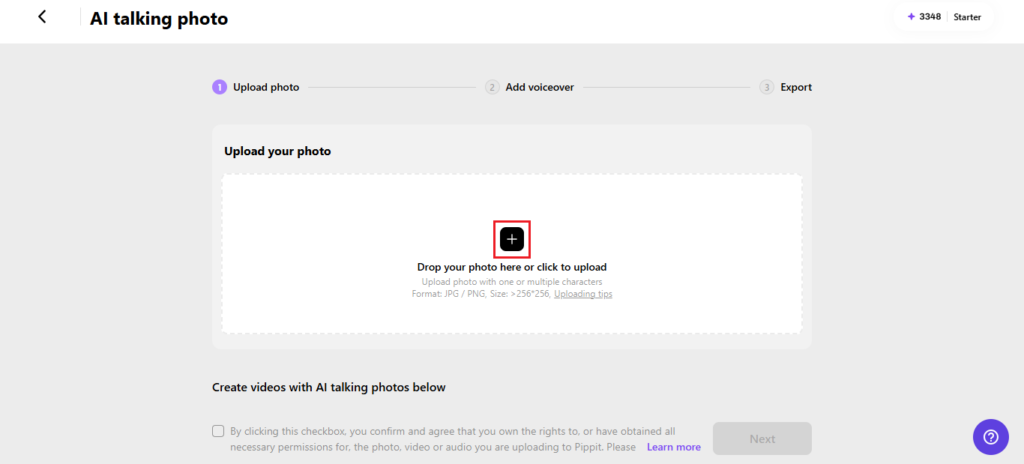
Pick the AI feature that lets a still image talk, then upload your arcade host by clicking the box or dragging the file in. Keep it at 256×256 pixels or above. Tick the permission box and click Next.
Step 2: Write the announcer lines
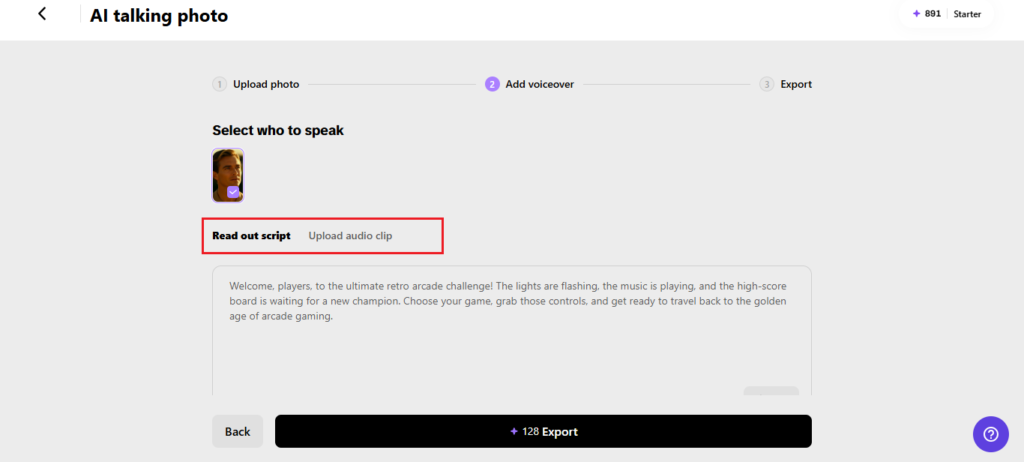
Choose Read out script and type your host’s patter. Set the language, check out several voices until one sounds big enough for the arcade floor, and select a caption style. Click Save. Prefer to record your own announcer voice? Use the Upload audio clip tab, or pick a trending clip.
Step 3: Save your high score
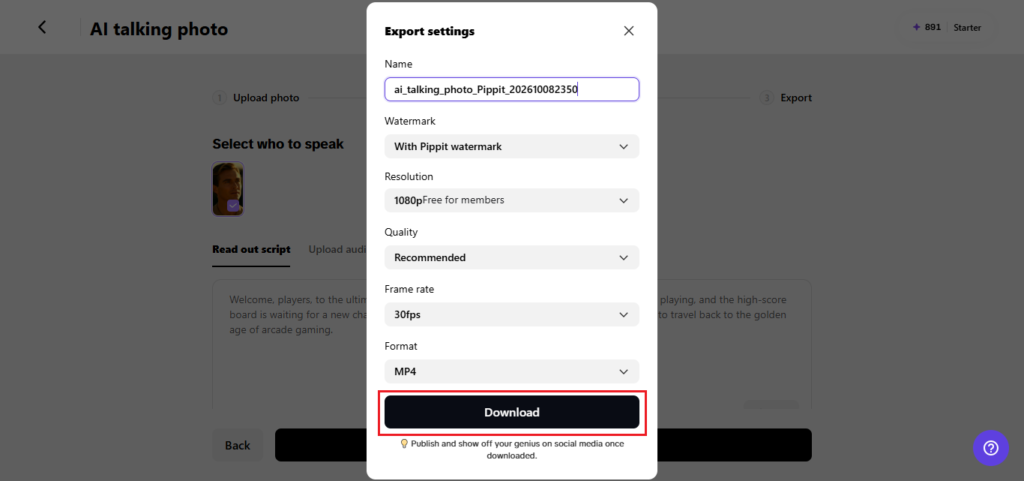
Click Export, rename the video, and decide on the watermark. Pick your resolution, quality, frame rate, and format, then click Download to save the finished clip.
Catchphrases, countdowns, and cheesy puns
Arcade hosts live on repetition. Choose a signature opening such as “Welcome back, challengers,” and use it every time. Add a countdown, like “Three, two, one, go,” when a segment starts. Puns are encouraged: “This game really knows how to pixel your buttons.” Keep your enthusiasm high but your sentences short, because shouting a whole paragraph sounds tiring. Throw in a recurring rival or a running gag so viewers have something to look forward to each episode, and don’t be afraid of silly sound words like boing.
Content ideas for your arcade channel
A host is only useful if there’s a show. Try a weekly high score hall of fame where the character celebrates fan-submitted records. Review classic games in sixty seconds. Run quick trivia rounds with the host reading questions and reacting to answers. Create a seasonal special where the character introduces a Halloween or holiday cabinet. Even product launches work, with the host announcing a new item like it’s the final boss. Plenty of formats, and all of them reuse the same simple setup.
High-score polish before you post
Take a minute to level up your clip. Make sure the portrait has sharp edges and bold colors, since retro art loses its charm when blurry. Match the voice to the character’s size, so a tiny robot doesn’t sound like a stadium announcer. Check that captions stand out against the neon background. Keep the clip tight, ideally under a minute, with the joke or reveal near the end. And always preview on a phone, because that’s where most arcade fans will end up watching.
Building a leaderboard that keeps people returning
A leaderboard gives your channel a hook beyond any single video. Invite viewers to submit their best scores, then have your host read out the top five each week with plenty of dramatic flair. Add rival names and playful trash talk so the competition feels alive. Let the host crown a new champion with a big countdown, and keep a little rivalry going between returning players. People love seeing their name mentioned, and they’ll often share the clip with friends. That small bit of recognition creates a loop, which brings new viewers and gives your host something fresh to announce.
Game on
A retro arcade host brings noise, nostalgia, and a good dose of silliness to any channel. With Pippit, the whole thing starts with a single picture and ends with a clip you can post in minutes. So design your character, write the opening shout, and press start. Open Pippit now and let your arcade host take the stage.